Bullhorn texting integration

Text candidates one-on-one, send automated follow ups and use AI to craft personalized messages, all synced with Bullhorn

  • Month-to-month
  • Keep your numbers
  • 10DLC registration handled
Bullhorn ==texting== integration

How does Bullhorn texting work with CallMantra?

Bullhorn ATS & CRM doesn't include texting in its core product.

If your team wants to text candidates, you can use an add-on such as Bullhorn Messaging or connect a separate platform. CallMantra brings calling, texting, AI note taking and more together for staffing agencies.

Recruiters can send and receive SMS and MMS from their business number, with messages and replies logged to the matching Bullhorn candidate or contact. Calls made from that number are logged there, too, so recruiters don't have to piece together a conversation from different tools.

What you can do in Bullhorn with CallMantra

Reach a whole Bullhorn candidate list
Power SMS

Reach a whole Bullhorn candidate list

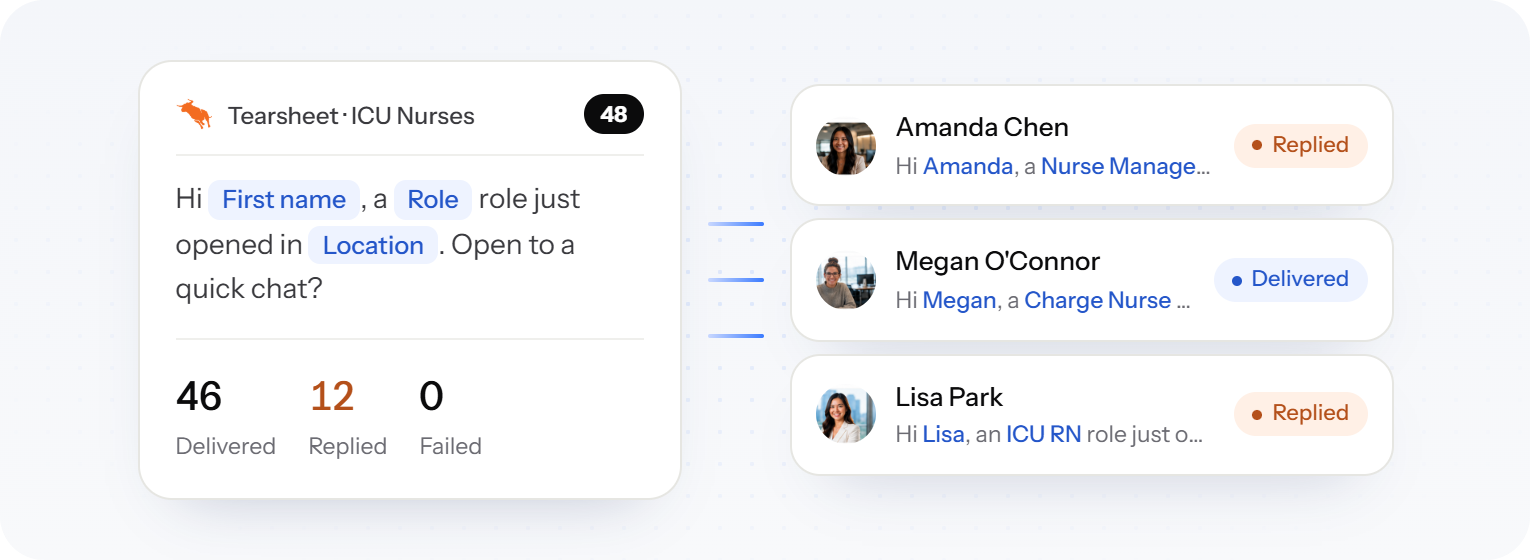
Send personalised messages to a list, using merge fields for details such as name, role and location. Track delivery and replies as they come in, with each reply linked back to the relevant candidate record.

Every text logged to Bullhorn
Auto Logging

Every text logged to Bullhorn

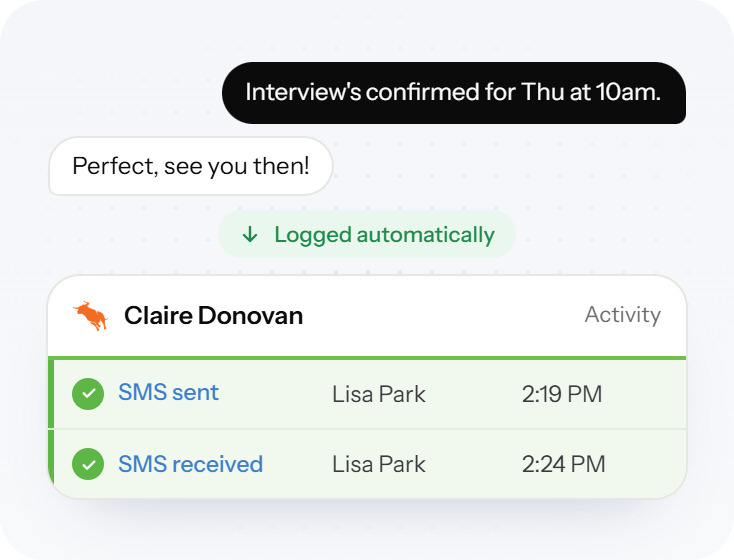
Every text and reply automatically logged to the right Bullhorn record. Recruiters can see who sent what and when, without copy-pasting or searching through inboxes.

Write a relevant candidate text without starting from scratch
AI Texting

Write a relevant candidate text without starting from scratch

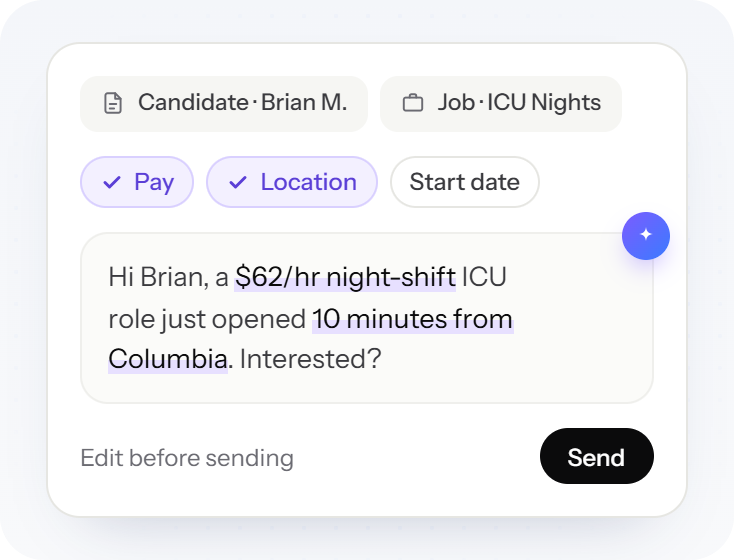
CallMantra AI uses candidate and job details to draft personalized texts recruiters can edit before sending. Focus on what matters most, from pay and location to start date.

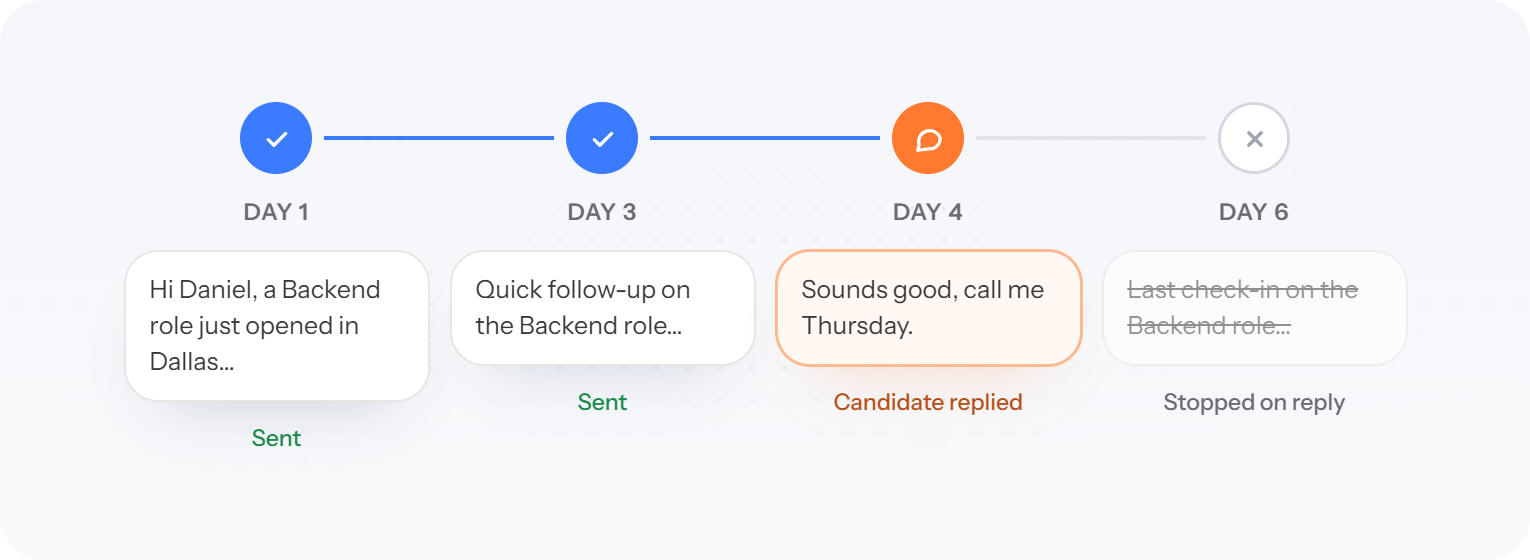
Schedule texts, stop on reply
SMS Sequencing

Schedule texts, stop on reply

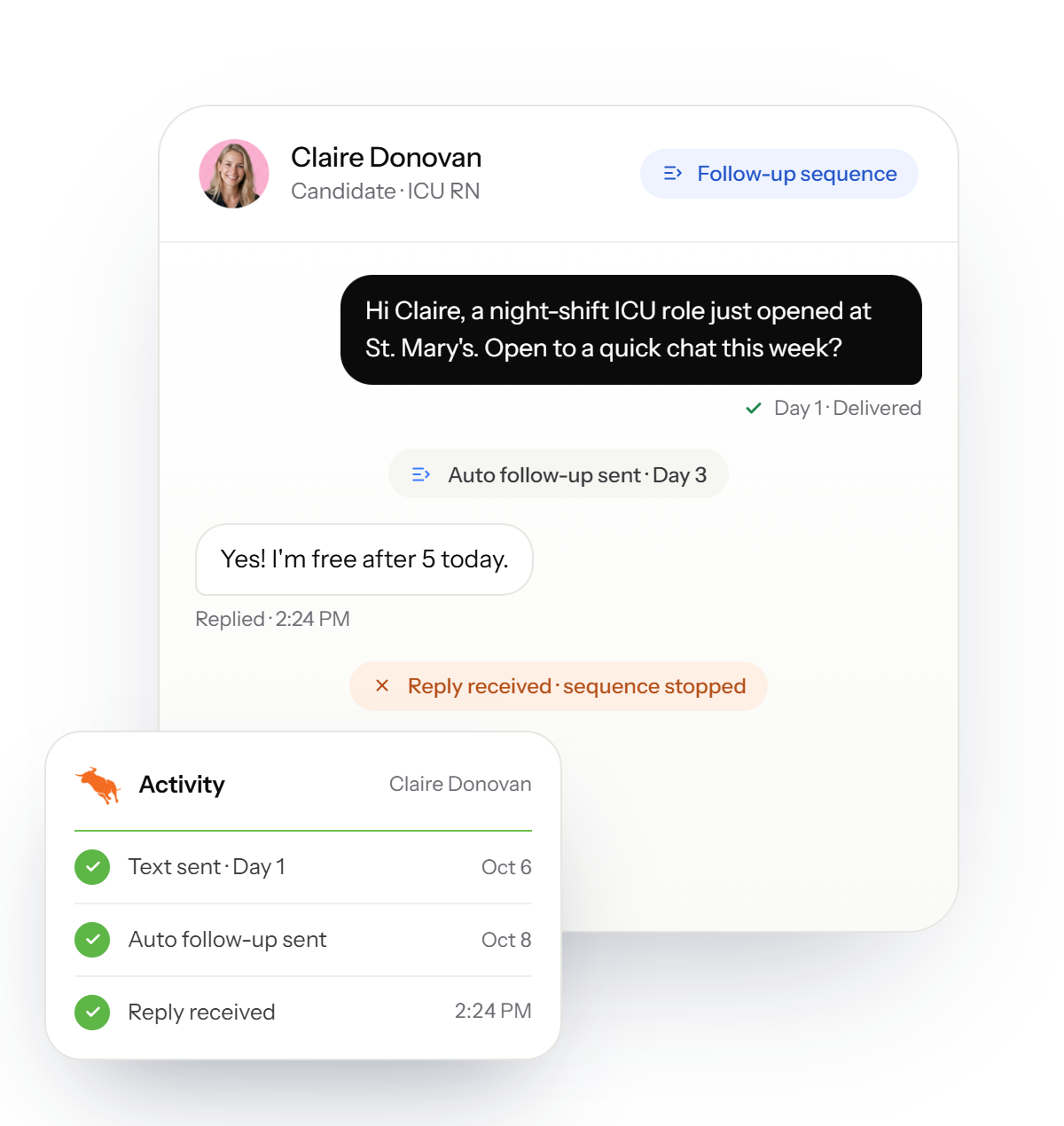
Set up a series of texts to go out over several days. CallMantra sends each one on schedule and stops the sequence as soon as the candidate replies.

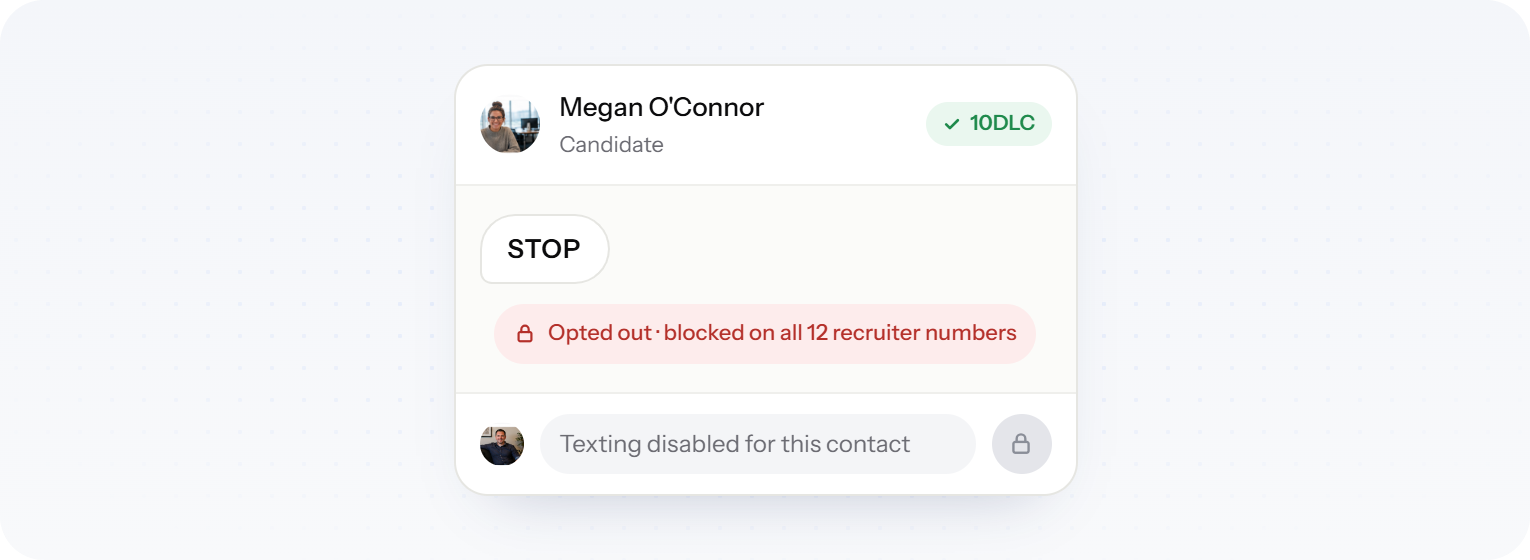
Manage SMS opt-outs and 10DLC registration
Opt-Outs and 10DLC

Manage SMS opt-outs and 10DLC registration

CallMantra applies STOP opt-outs across all recruiter numbers on your account and handles 10DLC registration for compliant US business texting.

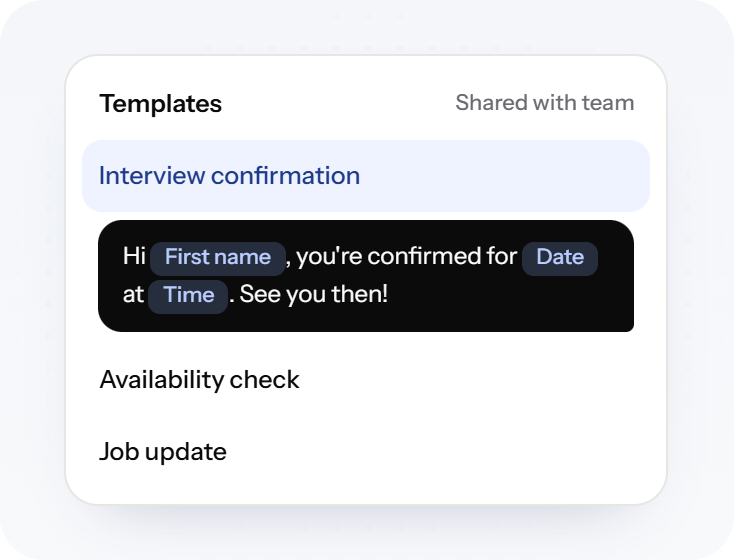
Ready-to-use text templates
SMS Templates

Ready-to-use text templates

Interview confirmations, availability checks and job updates are messages recruiters send all the time. Save them as templates that the whole team can use, then personalise them when needed.

Text from wherever
Apps and Chrome Extension

Text from wherever

Text candidates from Bullhorn, job boards, LinkedIn, or any website with the CallMantra Chrome extension. Stay connected on the go with desktop and mobile apps.

Switching your Bullhorn texting to CallMantra

  1. 01

    Try with 1 or 2 recruiters

    Start with a couple of recruiters, see how the workflow fits and take it from there. Get 14 days of full Premier access connected to Bullhorn. Test with a temporary phone number from us as well.

  2. 02

    Bring your numbers with you

    CallMantra ports the numbers you already use for calls and texts and registers them for 10DLC. Your current numbers stay live until the switch.

  3. 03

    Roll out when you're ready

    Onboarding is free, and you can mix plans by seat. Recruiters who need Premier features can use that plan without requiring every person on the team to have it.

Frequently asked questions

What are the challenges with Bullhorn texting?

Texting is easy enough. Keeping track of every conversation is where things can get messy.

  • Recruiters text candidates from their personal phones, so those conversations never make it into Bullhorn.
  • A candidate gets a call from one number and a text from another. They may not recognise either one.
  • Texts live in one inbox and call notes in another. When someone else picks up the conversation, they're missing context.
  • Want to reach a whole Tearsheet? Recruiters end up messaging people one at a time or exporting a spreadsheet.
  • A candidate replies STOP, but another recruiter doesn't know and texts them again the following week.
  • Follow-ups get missed because someone has to remember to send them.
Does Bullhorn have texting that’s built-in?

Bullhorn does not have built-in texting in the core.

Bullhorn offers a texting add-on called Bullhorn Messaging, and the Bullhorn Marketplace lists other Bullhorn SMS integrations. CallMantra connects with Bullhorn through its API and adds two-way texting and calling, with both logged to Bullhorn.

What is Bullhorn Messaging, and is it TextUs?

Bullhorn Messaging is Bullhorn's texting product. Bullhorn announced it in December 2020 as "powered by TextUs," and users sign in through a TextUs-hosted app. It supports one-to-one texts, group broadcasts and templates, and logs conversations to Bullhorn as notes.

What’s the difference between Bullhorn Messaging and CallMantra?

Bullhorn Messaging is Bullhorn’s texting add-on, powered by TextUs. It offers shared inboxes, group broadcasts, scheduled messages, templates, reporting, and Bullhorn Automation support, but calling requires a separate phone system.

CallMantra combines calling and texting on the same business number, with AI-drafted texts, AI call notes, and texting credits included in every plan. Its Premier plan also includes a Power Dialer. If you mainly need texting within Bullhorn Automation, Bullhorn Messaging may be a good fit. If you want calling, texting, and AI in one tool, CallMantra offers a more unified setup.

Bullhorn Messaging details from Bullhorn's own website.

Can we use CallMantra and Bullhorn Messaging at the same time?

Yes, as long as each runs on its own numbers. A team can start with one or two recruiters using CallMantra on new numbers, then port the rest when they're ready to switch.

Where do texts show up in Bullhorn?

Texts show up on the matching candidate or contact record, including the message, whether it was sent or received, the recruiter and the time.

Can I text a whole Tearsheet or search result?

Yes. Power SMS sends one personalised message to a list of candidates, and SMS Sequencing can follow up with anyone who hasn't replied. Both features are included with the Premier plan.

What happens when a candidate replies STOP?

CallMantra blocks texts to that number from every recruiter on your account when a candidate replies STOP. Opt-out management and 10DLC registration are built in.

Can I send pictures or documents by text?

Absolutely. CallMantra supports MMS, so recruiters can send job descriptions, directions, images or other supported attachments along with their message.

How much does texting cost?

Every CallMantra plan includes monthly texting credits, and extra texts cost 1.9¢ each. Each texting number has a one-time $69 fee that covers 10DLC registration and spam monitoring.

Plans start at $20.95 per user per month when billed annually, or $25.95 month-to-month.

From one-on-one texts to bulk outreach

Text candidates 1-on-1 or in bulk, use AI to draft personalized messages, and keep conversations logged in Bullhorn.